
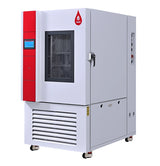
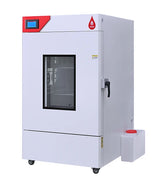
How to Use a Rapid Temperature Change Chamber: Load, Program and Maintain
Last updated November 2026 · LORDERAN how-to guide
Short answer: a rapid temperature change chamber ramps between −70 and +150 °C at a rated average of 5, 10 or 15 °C per minute, measured with an empty chamber. Your load slows it, so fill no more than three quarters of the volume, stagger the samples in the airflow and use open fixtures. Program each ramp as temperature span divided by rate, set the dwell long enough for the product to reach temperature, and loop the cycle. Keep the door closed mid-ramp, dry the chamber after sub-zero tests and look after the humidifier water. Figures come from the LORDERAN rapid temperature change chamber user manual.
1. What the rated rate means
Cooling comes from a two-stage cascade refrigeration circuit and heating from ceramic elements under PID control. The rated rate is a non-linear average at no load, commonly taken between 10 % and 90 % of the span. The chamber is fastest mid-range and slower near −70 °C and +150 °C.
Average, not linear
The first and last few degrees are slower.
Load in the airstream
Every kilogram inside must heat and cool too.
2. Install it
Electrical connection is for a qualified electrician; refrigerant pipes are for certified technicians only.
-
1Unload levelKeep it horizontal, lift from the long side with the forks spread and never use steel cables on a crane.
-
2SiteLevel, stable floor; ambient 5 to 32 °C at up to 85 %RH; low dust, nothing flammable and no fire detector directly above. Level the four casters with a spirit level.
-
3Room for airKeep the 40, 60 and 80 cm clearances from the manual. Air-cooled units slow noticeably when the room rises above about 30 °C, so size the room ventilation to the rated power.
-
4Power380 or 480 V three-phase to the nameplate, ±10 %, earth resistance up to 4 Ω, on a dedicated lockable breaker. With the phases in the wrong order the chamber will not start.
-
5Water and drainWater-cooled units: 5 to 32 °C water with shut-off valves and a Y-strainer, supply to IN, return to OUT. Keep the drain end out of the water: it also equalizes pressure during fast ramps.
3. Load for fast ramps
Air leaves at the top of the workspace and returns at the bottom, so every sample should sit in that stream. Remove the cable ties from the sample racks before the first run; they melt at high temperature.
-
1Three quarters at mostKeep the total load volume below 3/4 of the working volume.
-
2Stagger and spaceLeave at least one sample thickness clear on every side. Nothing on the bottom shelf or in front of the rear outlet.
-
3Open fixturesLight, perforated fixtures; spread the mass so one dense block does not shield the rest.
-
4Leads and powerRoute leads through the test port and seal it when unused. Tell LORDERAN the power any powered samples dissipate: it uses up cooling capacity.
-
✕Never insideExplosive, combustible, corrosive or conductive dispersible samples. Batteries and energized samples need a risk assessment and an interlock through the test-sample terminal.
4. Program a cycle
Ramp time in minutes is the span divided by the rate, rounded up and entered as hours.minutes in TIME. The manual's example runs −40 to +125 °C at 10 °C/min for 100 cycles: 165 ÷ 10 = 16.5, so each ramp is 0.17.
-
1Segments 001 to 005Ramp to +125 °C, hold 15 min, cool to −40 °C in 17 min, hold 15 min, heat back in 17 min. Add a last segment to +25 °C so the door can be opened safely.
-
2Loop and waitLOOP SET begin 02, end 05, cycle 100. WAIT ON with a 2 °C zone, so the dwell only starts once the chamber is there.
-
3Before you runPreview with CURVE. Set the over-temperature protector from the profile's highest temperature, and a logging interval shorter than the 60 s default.
-
4New productsPut a thermocouple on the product through the test port and run two or three cycles to measure how far it lags the air.
5. Run, humidity and shutdown
Start with the breaker, POWER, then RUN and START. Stop with STOP, then POWER, then the breaker. Never cut main power during a run.
While it runs
-
1Door shut mid-rampHold or stop the program and let it approach room temperature first.
-
2Read PV firstCheck the chamber temperature on screen just before opening; it can swing faster than you expect.
-
3GlovesAbove 55 °C or below 0 °C, heat- or cold-resistant gloves.
Humidity tests
-
1WaterDeionized, RO or distilled, up to 5 µS/cm. Never tap, softened or treated water.
-
2TankBetween 1/2 and 3/4 full, checked before each humidity test.
-
3HUMI OFFIn segments below 0 °C or above 100 °C and the ramps leading to them.
After sub-zero tests
-
1Dry itRun 60 °C with HUMI OFF for 30 minutes to clear frost before a cold phase and before shutdown.
-
2Power cut settingHot Start resumes the segment, but the first cycle after recovery does not count.
-
3Long idleDrain and dry the water system before two weeks or more of shutdown.
Do not touch surfaces above 38 °C or below 0 °C. The condenser fan can start at any time while the chamber has power, and the circulation fan keeps running about 5 minutes after a stop.
Alarms
DI1, DI2 and short-circuit alarms power the chamber off; let it cool and follow the manual before restarting. For the others, fix the cause and tap Reset.
Maintenance
Most routine work is on the humidifier water system. Never run the pump dry, and never let water freeze in the humidifier, pump or pipes.
Questions
Will my test reach 15 °C/min?
The rated rate is an average at no load. Samples, fixtures and shelves all add mass to heat and cool, so a loaded chamber ramps more slowly, especially near the ends of the range.
How long should the dwell be?
Long enough for the product, not just the air, to reach temperature. Measure the product lag with a thermocouple over two or three cycles.
What water does the humidifier need?
Deionized, RO or distilled water up to 5 µS/cm. Replace it monthly and the wet-bulb gauze every three months.
Which units need cooling water?
The faster and larger versions: for example the 250 L at 15 °C/min, the 500 L at 10 and 15 °C/min and every 1000 L version. Your nameplate shows AIR or WATER.